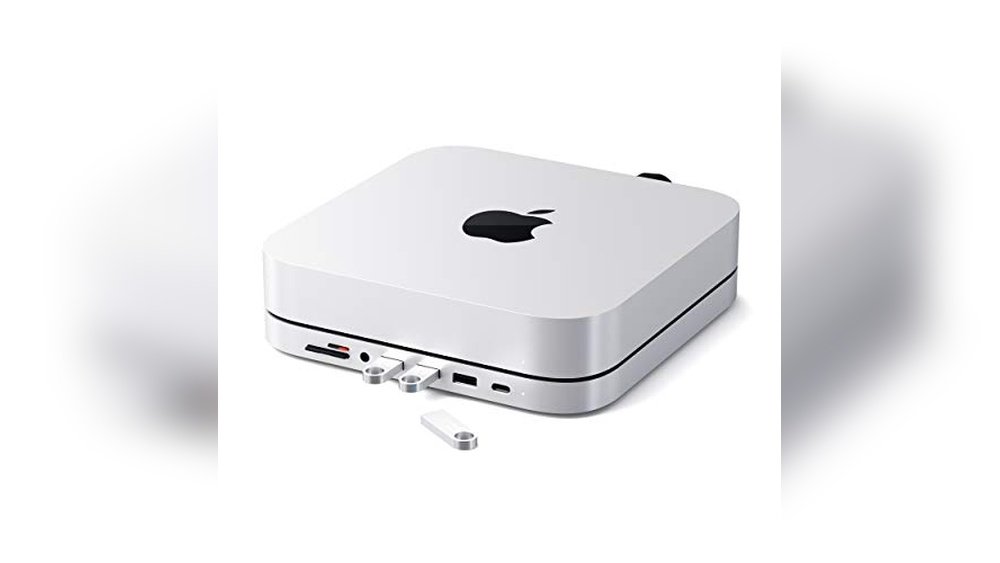
Have you ever tried to connect all your devices to your Mac Mini M1, only to find there aren’t enough ports? It’s frustrating when you have to unplug one thing just to use another.
This constant juggling wastes your time and breaks your workflow. But choosing the right USB hub changes everything. Suddenly, you can connect your keyboard, mouse, external drives, and more—all at once. It makes your workspace cleaner and your day smoother.
If you want to stop the hassle and enjoy easy, fast connections, you’re in the right place. Keep reading to find the best USB hubs designed to fit perfectly with your Mac Mini M1. These picks will help you get the most out of your device without the struggle. Let’s make your setup simple and efficient.
Satechi Usb C Hub
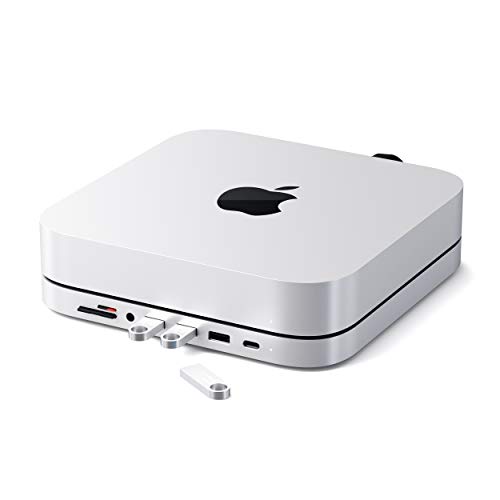
The Satechi USB C Hub is an ideal accessory for Mac mini M2/M1 users who need to expand their device’s connectivity options without cluttering their workspace. If you are someone who requires multiple ports including USB-C data, Micro/SD card readers, USB 3.0, and a headphone jack in a sleek and compact design, this hub is perfect for you. It is especially suitable for professionals, content creators, and tech enthusiasts looking for an efficient and stylish solution to enhance their Mac mini experience.
Pros:
- Durable Type-C aluminum stand design that complements the Mac mini
- Multiple connectivity options including USB-C data port, USB 3.0, Micro/SD card readers, and headphone jack
- Compact and lightweight with dimensions optimized for desktop use
- Seamless integration with Mac mini M2/M1 models
- Sleek silver color that matches Apple’s aesthetic
Cons:
- Not compatible with the Mac mini M4 model
- Limited to devices that support USB-C connections
The Satechi USB C Hub features a sturdy Type-C aluminum stand that not only provides additional ports but also acts as a stylish stand for the Mac mini. This design ensures your device remains elevated and cool, improving airflow and overall performance. The hub’s array of ports allows users to connect various peripherals simultaneously, making it a versatile solution for expanding your Mac mini’s functionality without the need for multiple adapters.
Users benefit from the hub’s fast data transfer speeds thanks to the USB 3.0 ports and convenient Micro/SD card readers for quick access to external storage. The inclusion of a headphone jack port adds to the versatility, allowing audio output without relying on Bluetooth or other wireless options. Its lightweight and compact design ensures it fits perfectly on any desk setup, maintaining a clutter-free workspace while enhancing productivity.
Satechi Mac Mini Hub & Stand With Ssd Enclosure

The Satechi Mac mini Hub & Stand with SSD Enclosure is ideal for Mac mini M1 and M2 users who want to enhance their device’s connectivity and storage capabilities. It is perfect for professionals, creatives, and tech enthusiasts seeking a sleek, all-in-one dock solution that also functions as a stand and supports NVME/SATA M.2 SSDs. Users with Mac Studio or older models excluding M4 will also find this accessory highly beneficial.
Pros:
- Integrates a high-speed SSD enclosure supporting NVME and SATA M.2 drives for expanded storage.
- Offers multiple ports including USB-C 10Gbps, three USB-A 5/10Gbps, and a 2.0 audio jack for versatile connectivity.
- Sleek silver design that complements the Mac mini aesthetics while acting as a functional stand.
- Compact and lightweight with dimensions optimized to fit perfectly under the Mac mini.
Cons:
- Not compatible with the Mac mini M4, limiting its use for future models.
- Limited to the ports provided, may require additional adapters for other connections.
The Satechi Mac mini Hub & Stand combines multiple functions into one elegant device, offering users an efficient way to expand their Mac mini’s capabilities. Its built-in SSD enclosure supports both NVME and SATA M.2 drives, allowing users to significantly increase their storage capacity without clutter. Additionally, the hub’s variety of ports, including a fast USB-C 10Gbps and multiple USB-A 5/10Gbps ports, provide seamless connectivity for peripherals like external drives, keyboards, and audio devices.
Beyond functionality, the device doubles as a sturdy stand designed to match the Mac mini’s style and dimensions perfectly. This helps improve airflow and organization on the desk, creating a cleaner workspace. While its compatibility excludes the newest M4 model, it remains an excellent accessory for users of the Mac mini M1, M2, and Mac Studio, offering a practical blend of style, speed, and convenience.
Acer 10 Gbps Usb C Hub

The Acer 10 Gbps USB C Hub is ideal for professionals and tech enthusiasts who require high-speed data transfer and multiple connectivity options on the go. This device is perfect for users of MacBook Pro (M2/M1), iPad, Surface Pro, and XPS laptops who need a reliable multiport adapter without video output capabilities but with powerful charging and data transfer features.
Pros:
- Supports ultra-fast 10 Gbps data transfer for efficient file sharing
- Equipped with 4 USB C 3.2 ports to expand connectivity
- Includes a 100W Power Delivery (PD) port to fast charge compatible devices
- Compact and lightweight design, weighing just 0.13 pounds, making it highly portable
- Compatible with a range of popular devices including MacBook Pro, iPad, Surface Pro, and XPS
- Sleek grey finish complements modern tech aesthetics
Cons:
- Does not support video output, limiting use for external displays
- Limited to USB C ports; no traditional USB-A or other port types included
The Acer 10 Gbps USB C Hub stands out with its ability to deliver blazing-fast data transfer speeds of up to 10 Gbps, making it an excellent choice for users who frequently move large files between devices. With four USB C 3.2 ports, this hub offers extensive expansion options, allowing multiple peripherals or storage devices to be connected simultaneously without sacrificing performance. The inclusion of a powerful 100W Power Delivery port ensures your devices remain charged quickly, supporting uninterrupted workflow during busy days.
Designed with portability and style in mind, this hub’s lightweight build and sleek grey color make it a great companion for professionals who work remotely or travel frequently. While it does not provide video output capabilities, it excels in data and power delivery functions, catering to users who prioritize those features. Its compatibility with popular devices like the MacBook Pro, iPad, Surface Pro, and XPS makes it a versatile accessory that integrates seamlessly into your existing tech ecosystem.
Sabrent Premium 3 Port Aluminum Usb 3.0 Hub With Multi In 1 Card Reader
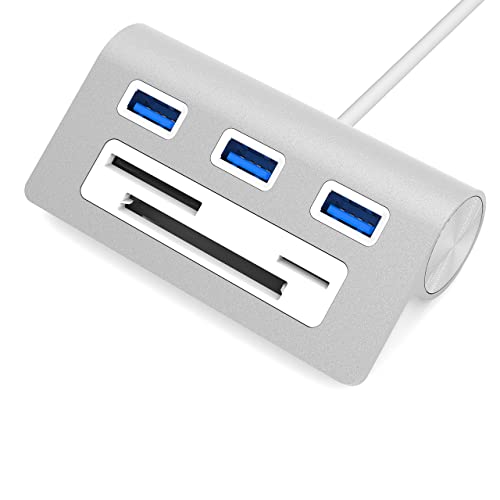
The SABRENT Premium 3 Port Aluminum USB 3.0 Hub with Multi in 1 Card Reader is ideal for users who need to expand their connectivity options, especially those using iMacs, MacBooks, Mac mini, or any PC. If you often work with multiple USB devices or memory cards and require fast data transfer in a sleek, compact design, this hub is perfect for you.
Pros:
- Three USB 3.0 ports provide high-speed data transfer up to 5Gbps.
- Built-in multi-in-1 card reader supports various memory cards.
- Aluminum construction offers durability with a stylish silver finish.
- Compact size with a 12-inch cable for easy placement and portability.
- Compatible with a wide range of devices including Mac and PC.
Cons:
- The 12-inch cable may be short for some desktop setups.
- Limited to three USB ports which might not be enough for heavy users.
The SABRENT USB 3.0 Hub features a robust aluminum body that not only looks premium but also dissipates heat effectively, ensuring stable performance during extended use. Its three high-speed USB 3.0 ports allow you to connect multiple peripherals such as external hard drives, flash drives, and keyboards simultaneously, significantly expanding your device’s connectivity. The integrated multi-in-1 card reader supports SD, microSD, and other common memory cards, making file transfers from cameras and other devices seamless and efficient.
Designed with portability in mind, this hub’s compact dimensions and lightweight construction make it an excellent travel companion for professionals and students alike. The silver color complements Apple devices perfectly, while the plug-and-play functionality ensures easy setup without the need for additional drivers. Whether you’re transferring large files or connecting multiple devices, the SABRENT Premium 3 Port USB Hub enhances productivity and convenience for both Mac and PC users.
Anker Usb C Hub
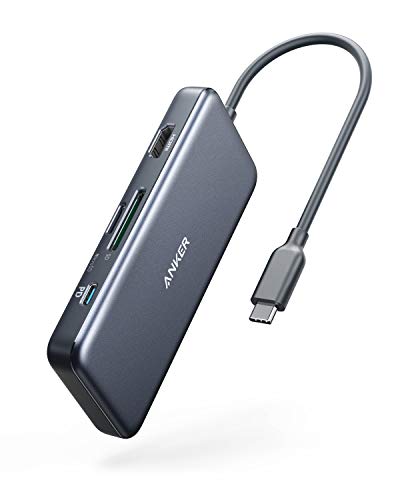
The Anker USB C Hub (7-in-1) is ideal for professionals, students, and tech enthusiasts who need to expand the connectivity options of their laptops such as the MacBook Air, MacBook Pro, and XPS. This compact and versatile hub is perfect for users seeking to connect multiple devices simultaneously, transfer data quickly, and enjoy high-quality video output without carrying multiple adapters.
Pros:
- Supports 4K HDMI output for crystal-clear video display.
- Offers 85W Power Delivery to keep your laptop charged efficiently.
- Includes both USB-C and two USB-A 5Gbps data ports for versatile connectivity.
- Equipped with microSD and SD card readers for easy media transfer.
- Compact and lightweight design with a sleek gray finish.
Cons:
- Limited to one HDMI port, which may restrict multi-monitor setups.
- The hub’s length might take up more desk space than ultra-compact alternatives.
The Anker USB C Hub (7-in-1) is designed to elevate your laptop’s connectivity by integrating multiple essential ports into one streamlined device. Its 4K HDMI port supports high-resolution displays, making it perfect for presentations, streaming, or professional video editing. The 85W Power Delivery ensures your laptop stays charged even during intensive tasks, reducing downtime and enhancing productivity.
Additionally, the hub features a combination of USB-C and USB-A ports with fast data transfer speeds up to 5Gbps, allowing users to connect external drives, peripherals, or smartphones seamlessly. The inclusion of microSD and SD card readers simplifies the process of transferring photos and videos, especially for creatives on the go. Compact yet robust, this hub is a practical and stylish accessory that complements your modern workspace.
Frequently Asked Questions
What Usb Ports Are Best For Mac Mini M1 Hubs?
The best USB ports for Mac Mini M1 hubs include USB-C 3. 2, USB 3. 0, and USB-A 5Gbps ports. These provide fast data transfer and compatibility with various devices.
Can I Use A Usb Hub With A Mac Mini M1 For Sd Cards?
Yes, many USB hubs for Mac Mini M1 come with Micro/SD card readers. This allows easy access and transfer of photos and files.
Do Mac Mini M1 Usb Hubs Support Power Delivery?
Some USB hubs offer power delivery up to 85W. This feature lets you charge your Mac Mini or connected devices efficiently while using the hub.
Are Aluminum Usb Hubs Better For Mac Mini M1?
Aluminum USB hubs offer durability and heat dissipation. They also match the Mac Mini’s sleek design, providing a stylish and long-lasting accessory.
Can I Connect Multiple Usb-c Devices To Mac Mini M1?
Yes, hubs like the Acer USB-C splitter support multiple USB-C devices simultaneously. This expands connectivity without sacrificing speed or performance.
Is An Ssd Enclosure Hub Compatible With Mac Mini M1?
Yes, certain hubs include SSD enclosures for NVME/SATA M. 2 drives. This allows fast external storage expansion and easy data access on your Mac Mini M1.
Conclusion
Choosing the right USB hub for your Mac Mini M1 makes a big difference in daily use. The hubs listed offer a mix of fast data transfer, multiple ports, and extra features like card readers and power delivery. Whether you need something compact like the Satechi USB C Hub or a multiport option like the Anker USB C Hub, there is a solution for every need.
Remember to pick a hub that fits your devices and work style. A good hub will keep your workspace tidy and make connecting devices easier. This way, you can focus more on your tasks and less on managing cables. Take your time to compare these options and choose the one that works best for your Mac Mini M1 setup.
Quality and convenience go hand in hand with the right USB hub.